Shopping: compare store prices in one search
On this page
Shopping searches many online stores at once for the product you want and lays their offers side by side: the price, the shipping, whether it is new or refurbished, and when the price was checked. When you find the offer you like, Go to takes you to that store's own page to buy it.
On 4Search, the Shopping tab compares store prices. On other sites of the 4 Network, the Shopping tab shows shopping news and articles, with a link to search Amazon.
#How it works
-
Select the Shopping tab and type what you want: a product (
sony wh-1000xm6), a kind of thing (wireless headphones), or both with a limit (wireless headphones under $50). -
Store prices fills in after a few seconds, as the stores answer. Each card is one product with its best offer.
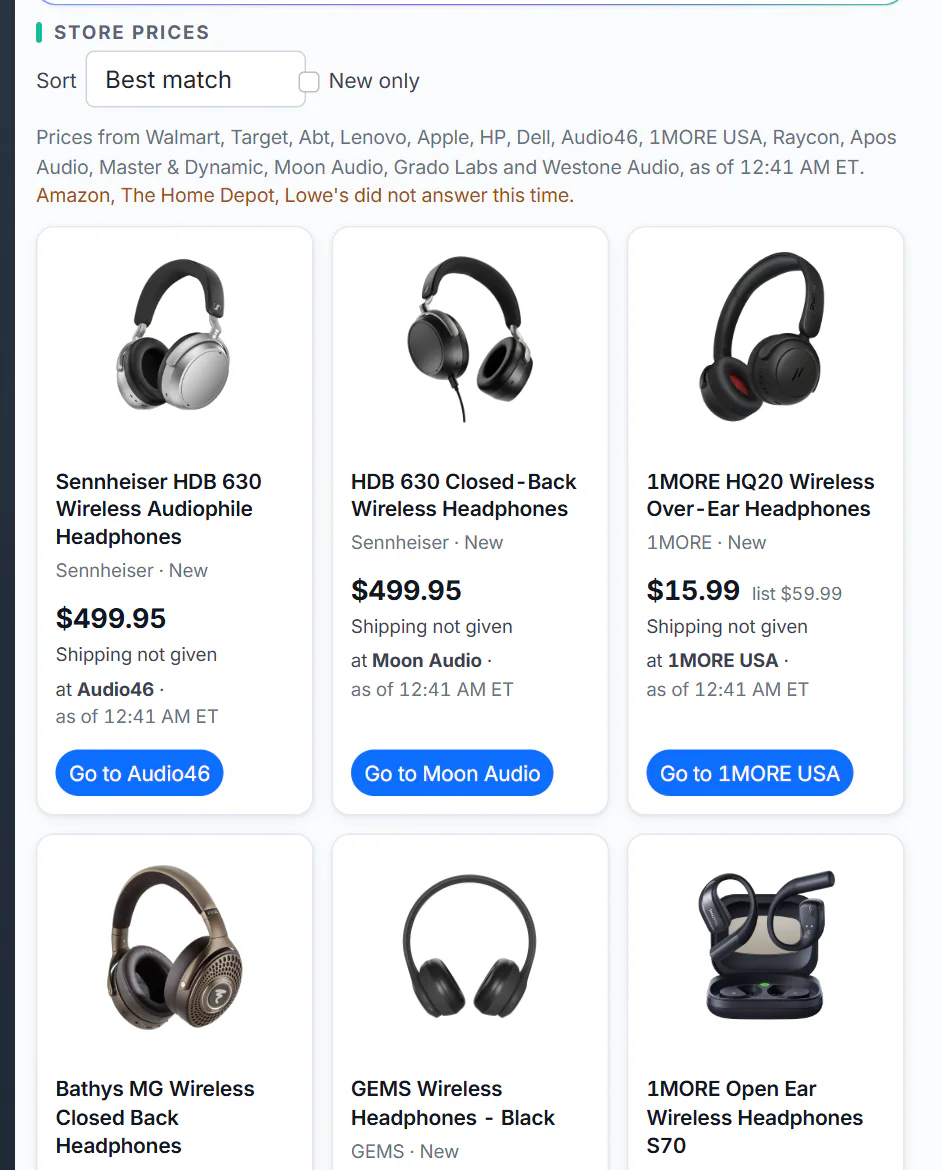
Store prices for wireless headphones. The line above the cards says which stores answered and when their prices were checked.
- 1Sort: Best match, Lowest price or Most stores
- 2New only hides used and refurbished offers
- 3The stores the prices come from, and when they were checked
- 4One product, with its best offer
-
Sort the cards, or tick New only. See Sort and narrow the results.
-
Select Compare on a card to see every store's price for that product in one table. See A product's prices at each store.
-
Select Go to to open the offer on the store's own site, where you check the final price and buy.
#What Shopping does, and what it does not
- It finds and compares offers. It does not sell anything: there is no cart, no checkout and no payment on 4Search. You buy from the store, under the store's terms, prices, shipping and returns.
- It shows when each price was checked. Stores change prices often; the price at the store's checkout is the one that counts. See How fresh the prices are.
- It does not keep a price history or send price alerts. It shows today's offers.
- It may earn a commission when you buy through some store links, at no extra cost to you, and says so beside the links. See Store links and commissions.
#Where the information comes from
- Prices, shipping, stock and product pictures come from the stores themselves, read from what each store shows its own shoppers, at the moment you search or shortly before.
- Ratings, when a card has one, are the store's own customer rating, shown as the store gives it and credited to that store ("4.6 of 5 at Lenovo"). 4Search does not add ratings of its own.
- Which stores answer depends on what you search for: big general stores, and specialist stores that sell that kind of thing. See Which stores Shopping checks.
The Shopping home, before you search, shows the latest shopping news.
#Common questions
Is Shopping free?
Yes. Searching and comparing are free, and buying through a link costs you nothing extra.
Can I buy something on 4Search?
No. 4Search never takes payment or an order. Go to opens the store's own page, and you buy there.
Who do I contact about an order?
The store you bought from. 4Search is not part of the sale and cannot see or change orders.
Why does my search show only articles and a link to Amazon?
You are on a site of the 4 Network that does not compare store prices. Store prices are on 4Search's Shopping tab.